Keyboards: You mean there's a choice?
For users of desktop computer systems, nearly everyone uses the keyboard that came bundled with it. And it's probably a crappy keyboard, too. Considering that the keyboard is the primary way we input data and commands into our computers, you want to ensure that communication method is as optimal as possible.
Here we'll discuss some keyboard history (for computers) and what you should be using today.
Early PC keyboards were quite heavy and had noisy keys that clicked rather loudly when typing. The "key travel" was also rather long to accommodate typists that were used to typewriters. They were also comparatively expensive to manufacture. But since the computer itself could easily cost $2,500 (already a lot of money but even more so in the 80s!) then it wasn't really a noticeable expense.

Early-mid 20th century typewriter keyboard
But as time moved on, computers became cheaper and so did the keyboards. Many computers today include suboptimal keyboards. But you can inexpensively buy a decent keyboard that fits your typing style. For what is essentially a board full of push-buttons, there's a remarkable amount of research and design that goes into today's better keyboards.
As I've visited my clients over the years and fixed their computers, I've typed on many keyboard models so I've developed a pretty good sense of what works well and what doesn't -- for me, anyway. So in this article, I'll go over what I believe makes for a good keyboard.
There's a number of things that affect how well a keyboard fits the user. e.g.
- Key travel distance: How far the key must be pressed to bottom out. This is a full stroke.
- Key side rake/ramp/slope angle: The extent to which a key's sidewall angle deviates from vertical.
- Key press tension to break: The "break" is the point during the keypress when you overcome the resistance and the key becomes easier to push, completing the full stroke. Keys have a break to give you tactile feedback.
- Return force: How strongly the key wants to return to the up position after a full stroke.
- Island or "chiclet" keys: Keys are separated by a bezel.
You really have little choice in picking individual metrics above unless you order a custom keyboard -- quite expensive. But there are plenty of commonly available keyboards that have well-designed and matched features.
Days of yore
Back in the day, typewriters -- even electric ones -- had keys with a long travel. Some models, especially manual machines, took considerable pressure to trigger. Manual typewriters had no mid-travel break. You had to whack the key pretty hard to make a good impression on the paper. Early PC keyboards were designed to accommodate typists accustomed to these typewriter keyboards.
But that was then. Few people born after the mid 80's and probably no one after the mid 90's have ever used a typewriter. So it no longer made sense to design computer keyboards that mimicked their typewriter progenitors.
Keyboard designers are now free to focus on the experience without regard to what came before. With that in mind, today's trend in keyboard design is flatter with shallow key travel and a lighter touch. And the timing is pretty good, too. Devices are smaller than ever, especially laptops, so there's less room for big, bulky keyboards.
Here are close-ups of various key styles.
#1: Island or "chiclet" keys: Shallow travel with no ramping at all. e.g. Sides of keys are vertical. These have a light touch and are excellent for light touch typists. But since touch is so light, typos can be more frequent as it takes less pressure to actuate off axis. Also notice the bezel surrounds each key. These are sometimes called "island" keyboards because the keys are the islands and surrounding bezels are the ocean.
#2: Steep Ramped keys: The sides are steeply ramped, almost vertical but not quite. Key travel is longer than island style keys. Typos are less frequent because the tops of the keys are smaller with a larger gap between keytops. A misaimed finger is less likely to hit the top edge of an incorrect adjacent key. The finger may touch the side of the errant key, but then it'll slide down without actuating.
#3: Shallow Ramped keys: The sides are shallowly ramped, much closer to horizontal than #2 above. Key travel is short. Typos are more frequent due to a misaimed finger being more likely to strike the edge of an incorrect adjacent key.
#4: Membrane keys: Virtually no key travel, stiff break tension, and you must hit the key dead-center. This design offers a poor experience and generally used only in harsh environments where keyboard interaction is minimal. Perhaps used to give brief commands to a machine in a workshop or factory setting.
#5: Ergonomic w/Island keys: There's lots of ergonomic keyboard designs with this split-angle design being probably the most popular.
Click on the various keyboard thumbnail pics to see the different styles up close.
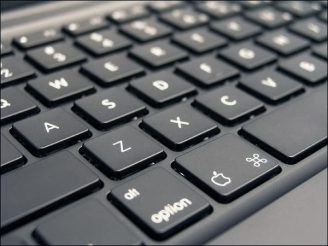


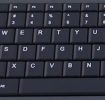
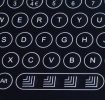
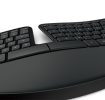
Five different styles of keyboard
Other considerations
Backlight: Common on high-end laptops. Lets you easily see the keys in dim lighting. This is a must-have feature for me. I won't consider a laptop without it. Although I'm a decent typist, I still need to look occasionally for the more specialized symbol keys. Backlit desktop keyboards are pretty rare and never come prepackaged with a computer. But there are aftermarket models with backlighting.
10 Key Pad: Standard these days on desktop keyboards and laptops with 15 inch or larger screens. Useful for accounting and numeric entry users.
Full-Sized F Keys: Sadly, the F keys are shrinking on many keyboards these days, especially on laptops. If you use the F keys a lot then you might want to find a keyboard with larger F keys. Most F keys these days do double-duty as media control such as volume, play, pause, etc.
Wireless: Not as important for a keyboard because it doesn't move, so the wire is no big deal. Mice? yes definitely. Keyboard? Not so much. But if you want a wireless keyboard, fine. There's no disadvantage. Just have some spare batteries on hand.
Tilt Feet: Most keyboards have foldout pegs or legs along the back edge to give a little more tilt toward you.
I'm using a Daskeyboard DKP13. It's heavy, has mechanical switches, keycaps in the style of #2 above, and is backlit.
Keyboards are a highly personal and intimate peripheral. It's your primary physical contact to your computer. You should spare little expense in getting exactly what you want for an optimum experience.